When we first provisioned Microsoft Fabric, the simplest operating model was obvious: leave the capacity running.
Technically, that worked.
Financially, it made very little sense.
The data platform was not processing data continuously. Most of the week, there was nothing for the Fabric capacity to do.
Operational schedules, business-specific identifiers, resource names, source-system details, and environment-specific configuration have been generalized. The architecture, technical decisions, implementation patterns, and measured outcomes are preserved.
During recurring weekday processing windows, an orchestration pipeline ingests source data into the bronze layer, then triggers the downstream transformations that build the silver and gold layers. The complete bronze → silver → gold process normally finishes within a relatively short processing window.
A separate recurring weekend workload follows a similar end-to-end pattern for another data source. The source data first lands in bronze, moves through transformation and validation work in silver, and finishes in a curated gold layer ready for reporting and analytics.
Outside those defined processing windows, no scheduled data workloads require the Fabric capacity to remain active.
There is also an additional seasonal workload. Because it operates only during part of the year, I deliberately kept it outside the permanent capacity schedule. When that processing season starts, its compute window can be enabled temporarily rather than paying for unused capacity throughout the year.
| Workload pattern | Scheduled processing |
|---|---|
| Recurring weekdays | Complete bronze → silver → gold processing chain |
| Recurring weekend window | Separate complete bronze → silver → gold processing chain |
| Outside processing windows | No scheduled data processing |
Yet the Fabric capacity itself could remain available 24 hours a day, 168 hours every week.
The workloads needed only a fraction of that.
Why keep the capacity running for 168 hours when the workloads only need it for a few?
Instead of trying to optimize individual notebooks or shave seconds from pipeline execution, I moved the optimization one level higher.
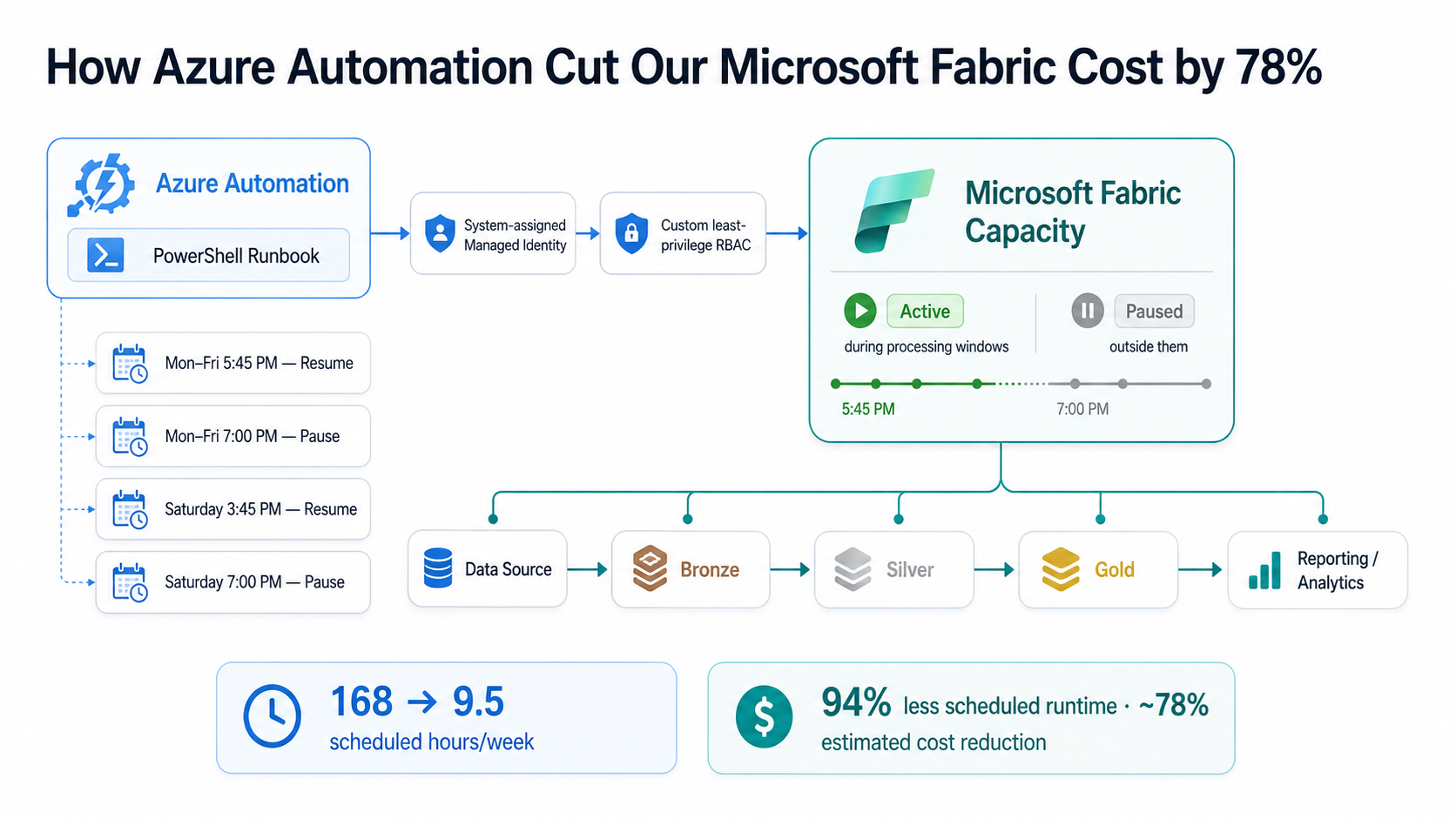
The solution used Azure Automation, a system-assigned managed identity, a least-privilege Azure RBAC role, one PowerShell runbook, and a small set of schedules.
The problem was not the pipelines
Cost optimization conversations often start inside the workload.
Can the notebook run faster? Can transformations be simplified? Can refresh frequency be reduced? Can the pipeline use fewer activities?
Those are all valid questions. But they were not the biggest opportunity here.
The pipelines already had reasonably short execution windows. The much larger inefficiency existed outside them.
Imagine a restaurant that serves customers for two hours every evening but keeps the entire kitchen operating 24 hours a day. Making the chef work 10% faster might help.
Closing the kitchen when there are no customers helps much more.
The Fabric capacity had essentially the same problem.
Fabric knew how to execute the pipelines. It did not know when the organization actually needed the compute.
We had to provide that intelligence ourselves.
First, I mapped the real compute windows
Before automating anything, I documented when compute was actually required.
The recurring weekday workload had a predictable processing window.
Because it orchestrates the complete bronze → silver → gold chain, I did not want the capacity to resume at exactly the same moment the first workload was scheduled to begin.
The platform should already be available before processing starts.
So I added a startup buffer.
The weekend workload required a larger processing window because it included additional scheduled stages.
That produced a small set of recurring automation events.
| Schedule | Pattern | Timing | Action |
|---|---|---|---|
| Weekday start | Recurring weekdays | Before processing window | Resume |
| Weekday end | Recurring weekdays | After completion buffer | Pause |
| Weekend start | Recurring weekend window | Before processing window | Resume |
| Weekend end | Recurring weekend window | After completion buffer | Pause |
Some additional capacity time is a better trade-off than suspending a production workload that happens to run longer than usual. The goal was safe savings, not a theoretically perfect utilization number.
Automation without stored credentials
Once the compute windows were clear, the next question was authentication.
Something has to call Azure and tell the Fabric capacity to pause or resume.
The easy implementation would be to put credentials into a script or run the process under an account with broad Azure permissions.
I didn't want either.
Instead, I created an Azure Automation Account and enabled its system-assigned managed identity.
That gave the Automation Account its own identity in Microsoft Entra ID.
No username. No password. No client secret.
The automation authenticates to Azure as itself.
But authentication was only half of the problem.
The identity still needed authorization to operate the capacity.
I didn't give the automation Contributor access
The runbook had one responsibility: manage the lifecycle of one Fabric capacity.
Giving it Contributor access across an entire subscription would have worked technically, but it would also have granted the automation far more authority than it needed.
Instead, I created a custom Azure RBAC role containing only the Fabric capacity operations required by the process:
Microsoft.Fabric/capacities/read
Microsoft.Fabric/capacities/write
Microsoft.Fabric/capacities/suspend/action
Microsoft.Fabric/capacities/resume/action
I assigned that role to the Automation Account's managed identity at the individual Fabric capacity resource scope.
The automation did not receive broad control over every Azure resource.
It received permission to operate the resource it was responsible for.
Cost automation should not create a new security problem.
One runbook controls both actions
I could have created separate runbooks for pause and resume.
I deliberately didn't.
Both operations act on the same resource and differ only by the requested action, so I created one parameterized PowerShell runbook.
param (
    [Parameter(Mandatory = $true)]
    [ValidateSet("Pause", "Resume")]
    [string]$Action
)
The schedules call the same runbook with either Action = Resume or Action = Pause.
At a high level, the runbook performs six steps.
- Authenticate Use the Automation Account's managed identity.
- Read state Check the current state of the Fabric capacity.
- Compare Determine whether a state change is necessary.
- Act Call either the suspend or resume operation.
- Verify Poll the capacity until the requested state is reached.
- Fail clearly Raise an error if the transition does not complete.
The state check is worth having.
Suppose somebody manually resumes the capacity before the scheduled processing window.
When the automation later runs, instead of blindly submitting another resume operation, the runbook checks whether the capacity is already active.
If it is, there is nothing to do.
The same applies to pause.
In other words, the automation is designed to be idempotent.
The core control logic
# Configuration values intentionally anonymized

if ($Action -eq "Pause") {
    $apiAction    = "suspend"
    $desiredState = "Paused"
}
else {
    $apiAction    = "resume"
    $desiredState = "Active"
}

# Avoid unnecessary operations
if ($currentState -eq $desiredState) {
    Write-Output "Capacity is already in the desired state."
    exit 0
}

# Submit the requested capacity operation
Invoke-WebRequest `
    -Uri $actionUri `
    -Method POST `
    -Headers $armHeaders `
    -ContentType "application/json"
The production runbook goes one step further.
After the API accepts the request, it continues polling the Fabric resource until the expected state is actually reached.
An accepted API request is not the same thing as a completed state transition.
I tested both directions before scheduling anything
I did not attach the runbook to production schedules immediately.
First, I manually tested the pause operation using the Azure Automation test pane.
Authenticating using Automation Account managed identity...

Fabric capacity: [redacted]
Current state: Active
Requested action: Pause

Submitting Pause request...

Request accepted. HTTP status: 202

State check 1 : Pausing
State check 2 : Paused

SUCCESS: Fabric capacity is now Paused.
That single test validated several components of the design at once.
- Managed identity authentication worked.
- The least-privilege RBAC assignment was sufficient.
- The Fabric capacity management endpoint was accessible.
- The pause request was accepted.
- The runbook observed Active → Pausing → Paused.
I then ran the same test with Action = Resume and verified that the capacity returned to Active.
Only after both directions worked manually did I publish the runbook and connect the schedules.
A scheduled automation that has never been tested manually is just a scheduled failure waiting for the right time.
Then I attached the schedules
Once the runbook was proven, the remaining implementation was surprisingly small.
A small set of schedules calls the same runbook with different recurrence patterns and parameters.
Action = ResumeAction = PauseAction = ResumeAction = PauseThe schedules use the environment's local time-zone configuration rather than manually calculated UTC timestamps.
That keeps capacity windows aligned with workload schedules through daylight-saving changes without maintaining separate seasonal schedules.
The normal processing flow
The weekend workload follows the same principle, with a longer capacity window around its scheduled processing.
168 hours became approximately 9.5
This was the number that made the decision particularly interesting.
A week contains 168 hours.
The permanent scheduled capacity windows total approximately:
| Window | Approximate weekly runtime |
|---|---|
| Recurring weekday windows | ~6.25 hours |
| Recurring weekend window | ~3.25 hours |
| Total scheduled runtime | ~9.5 hours / week |
Scheduled availability therefore changed from:
That represents approximately a 94% reduction in scheduled capacity runtime.
I intentionally do not describe that as a 94% reduction in the Azure bill.
Cloud billing is rarely that simple.
Storage remains. Actual workload consumption matters. Platform accounting matters. Other services can also contribute to overall cost.
So rather than assuming that a 94% reduction in scheduled runtime would translate directly into a 94% reduction in cost, I used a deliberately conservative financial model.
The model allows for the reality that not every Fabric-related cost disappears when capacity is paused, and that actual workload consumption can vary.
Even after allowing for that additional consumption and variability, the expected reduction in Fabric capacity cost is approximately 78%.
The 78% figure is a conservative modeled estimate based on scheduled capacity availability rather than a claim based on a full year of invoices. As sufficient billing history accumulates, the model can be compared with actual Azure Cost Management data.
The biggest saving required no pipeline optimization
What I like most about this change is what we did not have to do.
- We did not redesign the medallion architecture.
- We did not rewrite bronze ingestion.
- We did not change the silver transformations.
- We did not simplify the gold layer.
- We did not reduce the frequency of business workloads.
- We did not move processing to another platform.
The pipelines continue to operate exactly as they did before.
The optimization happened around them.
That is an important distinction in cloud architecture.
Sometimes the biggest cost improvement is not hidden inside SQL, Spark, Python, a notebook, or a data pipeline.
Sometimes the resource simply should not be running.
The risk: what if a workload runs long?
Scheduled shutdown introduces one obvious operational risk.
What happens if a workload that normally completes within its expected window is still processing when the scheduled pause event arrives?
At that point, a hard capacity pause stops being a cost optimization.
It becomes an availability problem.
This is why the schedules include completion buffers instead of pausing the capacity immediately after the expected processing time.
Today, workload execution is predictable enough that a fixed window is a reasonable trade-off.
But I would not consider this design permanently finished.
If processing durations become more variable, the next iteration would be workload-aware suspension.
For the current workload volume, that additional complexity is not yet justified.
I do not want to build a sophisticated control plane for a problem that a small set of schedules already solves reliably.
Seasonal workloads stay seasonal
An additional workload becomes active only during part of the year.
I intentionally did not expand the permanent weekly compute window to accommodate it.
When that processing season starts, the relevant capacity schedule can be temporarily added or modified.
When the season ends, the additional compute window can be removed.
This prevents the infrastructure schedule from gradually accumulating permanent runtime for workloads that are active only occasionally.
Capacity should follow demand.
What I will monitor from here
The automation is working, but the cost story should now be validated against real operational and billing data.
Compare monthly Fabric spending with the original always-on estimate.
Watch whether processing chains begin approaching their configured pause boundaries.
A failed resume matters because downstream workload schedules may still attempt to execute.
The automation that saves money has now become part of the operating platform.
It deserves monitoring like any other production dependency.
The lesson wasn't “use Azure Automation”
Azure Automation happened to be the mechanism.
The more important lesson was architectural.
When we think about cloud cost, we often start with choosing a smaller capacity, optimizing queries, reducing storage, or rewriting workloads.
Those are useful tools.
But there is an even more basic question worth asking first:
Does this resource need to be active right now?
The Microsoft Fabric workloads already had clearly defined operating windows.
The compute did not.
A small set of schedules fixed that mismatch.
The result was a 94% reduction in scheduled capacity runtime and an estimated 78% reduction in capacity cost, while preserving the existing end-to-end data architecture.
No pipeline redesign. No workload-frequency reduction. No stored automation credentials. No broad Contributor access.
Just a small amount of orchestration around infrastructure that previously stayed on because nothing had told it when to stop.